
Best AI Presentation Maker Tools 2025: Top 10 Platforms for Smart Slide Design Compared
Save hours — get a first draft in minutes and lift your slide game. This guide explains how modern AI presentation makers turn a topic and a few key details into a polished deck quickly, so you spend less time on formatting and more time on message.
What to expect: this article shows how tools powered by artificial intelligence build slide structure, recommend images and icons, and add quick speaker notes. Some platforms — for example PoweredTemplate — offer near-instant text-to-presentation downloads in PPTX, Google Slides, and PDF with Slide Master support. Other template-first, free-tier services (described here as “Slidesgo-style”) provide monthly free creations and large template libraries but typically require an account to download editable files.
How this guide helps you: it sets clear expectations on design quality, export formats, template depth, and free vs. premium limits so you can pick the right presentation maker for your workflow. We compare the top AI tools of 2025 and recommend the best option for different needs — from classroom lesson decks to investor-ready business presentations.
Follow this guide to create presentations faster: understand export choices (PPTX, Google Slides, PDF), assess template breadth, and match speed vs. brand control so your slides fit the audience and purpose.
Ready to jump in? Scroll to the tool comparison or try the top pick and generate a draft now to test results with your content.
The AI Presentation Revolution — Why It Matters in 2025
Start faster: modern presentation makers turn a few ideas into a full deck in minutes, so you can save time and focus on your message. In 2025, deeper artificial intelligence integrations and realtime collaboration mean these generators do more than speed creation — they slot directly into team workflows and review cycles.
Real-world gains matter. Vendors often report large reductions in time to first draft and measurable improvements in polish, though results vary by use case and input quality. Template-driven services (here described as “Slidesgo-style”) still shine when you need many ready-made templates quickly; brand-focused platforms emphasize Slide Master support and export fidelity for business use.
Here’s what a smart AI presentation maker typically delivers:
Draft a full deck in minutes — saving you time on first-pass structure so edits concentrate on messaging and data.
Consistent, onbrand style with theme presets and Slide Master support to keep fonts, colors, and spacing uniform.
Layout and visual suggestions (images, icons, and pacing) that improve clarity and the final presentation.
Flexible inputs — short prompts, pasted text, or uploaded notes to match how you work and turn ideas into slides.
How to Evaluate AI Presentation Makers for Professional Results
Our review focuses on the features that matter when you need professional presentations fast. We evaluate each presentation maker against a compact rubric so you can quickly see which tool delivers the best design, export fidelity, and workflow for classroom or business use.
Design quality, templates, and visual polish
We assess typography, color systems, spacing, and how layouts adapt to your text and images. Prioritize tools that preserve Slide Master edits and let you lock brand elements — this is essential when your team needs consistent, professional presentations. Some platforms advertise thousands of templates; template-first services (here called “Slidesgo-style”) commonly offer large free libraries for quick starts.
Speed to first draft and time to usable deck
We measure time from brief to a usable draft. Tools that generate near-ready decks with minimal manual fixes score higher — but speed only matters if the output meets your quality needs. We note vendor time-saving claims and validate them with test runs where possible.
Customization, brand control, and ease of editing
Key checks: Slide Master support, theme locking, and export fidelity to PPT (PPTX) and Google Slides. A presentation maker that breaks masters or swaps fonts on export will add manual work downstream, so export behavior is a core part of the evaluation.
Scoring rubric (example): we rate each tool 1–5 on Design, Speed, Templates, and Exports. For transparency we show component scores and a simple average — e.g., Design 5, Exports 5, Templates 4, Speed 4 → overall 4.5.
Quick test you can run: paste a 100–200 word brief (topic + audience + three takeaways) and time how long the tool takes to produce a slide deck. Note the slide count, whether images and layouts look balanced, and whether exported PPTX opens with Slide Master intact in PowerPoint or Google Slides.
Quick visual example: include one generated slide labeled “Good” (clean typography, balanced image, clear hierarchy) and one labeled “Needs work” (crowded text, inconsistent spacing) to illustrate where AI saves time and where manual edits are still needed.
Top 10 AI platforms for slide design you should consider
Choose from ten top platforms that speed creation while keeping slides polished and onbrand. Below are concise notes on where each presentation maker shines so you can pick the right tool for your workflow and deliver professional presentations faster.

PoweredTemplate
Best for: business teams that need brand control and reliable exports.
Pros: strong Slide Master support, robust template libraries (platform claims thousands), and dependable PPT/PPTX and Google Slides exports. Cons: Some advanced export and batch features sit behind premium tiers. Who it's for: brand teams and consultants creating polished investor decks and client presentations.
Slidesgo-style AI Generator
Best for: fast starter templates and low-cost lesson decks.
Pros: an easy free presentation maker option with many ready-made themes and large starter libraries (often ~150+ free templates). Cons: fewer deep brand controls than enterprise-focused tools. Who it's for: students and teachers building lesson plans, study decks, and classroom presentations.
Brisk
Best for: content repurposing from articles, PDFs, or videos.
Pros: converts long-form content into Google Slides quickly, preserving structure for rapid editing. Cons: export focus may lean toward Google Slides rather than full-featured PPTX. Who it's for: marketers and educators who turn blog posts, reports, or videos into slide sequences.
Oreate AI
Best for: fast, personalized ai-generated presentation creation (verify current product details).
Pros (to verify): emphasizes personalization, brand kit import, one-click themes, and rapid text-to-deck generation with speaker-note drafts; common export options are reported to include PPTX, Google Slides, and PDF. Cons: confirm free plan limits and exact export behavior. Who it's for: anyone who wants a highly personalized, speedy workflow—from students creating lesson slides to business teams producing investor-ready decks. (Verify Oreate AI features and limits before relying on these claims.)
Gamma: web-first decks with modern themes and shareable links — great for web-native presentations and lightweight collaboration.
Canva: massive template library plus image and video support — ideal for visual-heavy slides and students who need quick, attractive results.
Microsoft PowerPoint Designer & Copilot: native PPT workflow with layout suggestions and strong Slide Master control for enterprise-grade, on-brand exports.
Google Slides + add-ons: collaborative editing and smart add-ons for fast team workflows and cloud-first edits.

How AI-generated presentations work
Give a topic, set the tone, and watch a full deck assemble itself from your brief.
An ai-generated presentation is created automatically from your instructions. You provide text or pasted content, specify the audience and tone, and the presentation generator builds slide titles, concise bullets, and suggested visuals. Many presentation makers accept short prompts or longer briefs — the clearer and more specific your text, the better the slide structure the tool produces.
The system typically organizes content into sections so your talk flows from introduction to conclusion while maintaining global styles (fonts, colors, spacing). Common export options include PPT/PPTX, Google Slides, and PDF — check each tool for exact export behavior and whether premium tiers are required for editable downloads.
Typical input → expected slides (heuristic)
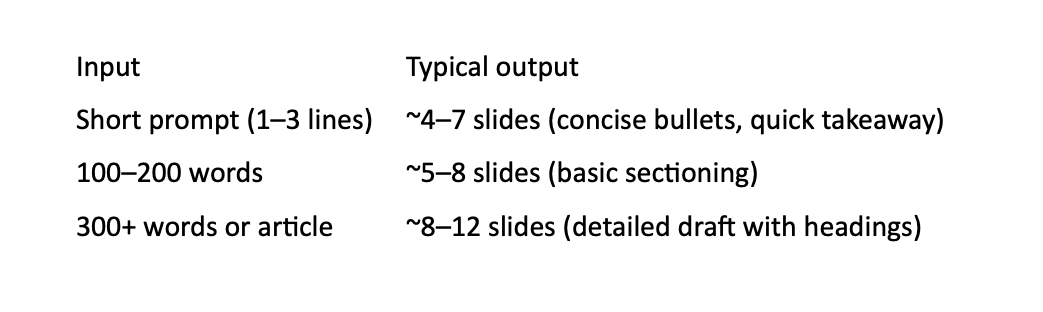
When to tweak: accept the first pass for speed, then edit copy, swap layouts, or change slide density to match your voice and audience. For data-heavy slides, add concrete examples and source notes so the deck reads credibly.
Exports: move the file to PowerPoint (PPTX) for deep edits, to Google Slides for live collaboration, or to PDF for locked distribution. Verify whether exports preserve Slide Masters, fonts, animations, and embedded media — export fidelity varies by presentation maker.
Oreate AI (to verify & cite): Oreate AI emphasizes rapid personalization—reported features include one-click theme selection, brand kit import, and fast text-to-deck generation that includes speaker-note drafts. Confirm Oreate AI’s exact export formats (PPTX, Google Slides, PDF) and free plan limits before relying on these specifics.
Conclusion
Choose the right maker and you’ll turn a topic and a few notes into clear, shareable presentations fast. Match your export needs (PPTX vs Google Slides vs PDF) and brand controls to the tool’s strengths before you commit.
Use templates and Slide Master edits to keep style consistent for students, teachers, or business reviews. Tools like PoweredTemplate, Slidesgo-style generators, and Brisk handle text-to-deck conversion, URL imports, and reliable exports for most workflows.
Clear inputs — your topic, audience, and desired outcomes — help the generator shape structure and save time. Double-check images and videos after export to ensure media and animations survive the download intact.
Next step: pick a presentation maker that fits your workflow, generate a first draft, and refine the details that make your ideas memorable.
Find Your Perfect Match: Why Oreate AI Stands Out
Oreate AI is positioned as a leading ai presentation maker for 2025 because it emphasizes personalization, speed, and export flexibility. Reported features include brand kit import, one-click themes, and rapid ai-generated presentation creation with speaker-note drafts — which can accelerate slide creation for students, teachers, and business teams alike. Before you choose, verify Oreate AI’s current free presentation limits and exact export formats (PPTX, Google Slides, PDF) so you know how it fits your workflow.
Try Oreate AI — the best AI presentation maker for 2025 (verify claims): generate a draft, test PPTX and Google Slides exports, and see how its personalization and brand controls help you create stunning presentations quickly.
FAQ
1. What formats can I export my slides to?
Oreate AI allows you to export in PPTX, Google Slides, and PDF, giving flexibility for offline editing, online collaboration, or sharing locked copies.
2. How can I speed up the slide creation process?
Oreate AI turns a short brief or notes into a structured, polished presentation in minutes, including layout suggestions, visuals, and draft speaker notes.
3. How do I maintain brand consistency across slides?
With brand kit import, one-click themes, and global style controls, Oreate AI ensures logos, colors, and fonts remain uniform throughout the deck.
4. Who can benefit most from using this tool?
Oreate AI is ideal for students creating study decks, teachers preparing lesson plans, and business teams drafting client or investor presentations, enabling fast, professional results.
5. How customizable is the presentation after AI generation?
You can edit text, visuals, layouts, and pacing freely. Oreate AI provides a polished first draft, leaving full control for refinements to suit your audience and tone.