CS2 Configs: What Actually Matters, According to People Who’ve Tried Everything
You’re not the first one to dive into YouTube rabbit holes or Google “cs2 cfg” at 2 a.m. after missing a sitter on Mirage. Everyone’s chasing that setup — the one that finally makes everything click. The perfect headshot machine. The buttery-smooth aim. The config that makes you play like someone who doesn’t lose every pistol round.
Here’s the thing: configs aren’t magic. What they are is leverage. They’re the invisible part of your setup that either helps you or holds you back. Most of the time, you don’t even realize you’re fighting your own settings — until you aren’t.
This isn’t another copy-paste pro config thread. It’s the config breakdown for people who’ve tried everything, changed everything, and still think maybe, just maybe, one more tweak will do it.
Sensitivity Is a Cult
Short movement. Long obsession. This section breaks down the real deal behind sensitivity setups.
Let’s start with the sacred number: eDPI (DPI × in-game sensitivity). If you’ve been treating DPI and sensitivity like two separate puzzles, it’s time to stop playing Sudoku and do some actual math.
Before we hit the numbers, here’s the tradeoff:
Low sens = better tracking, harder turns
High sens = quicker 180s, harder precision
Here’s a breakdown of eDPI ranges to give you some reference:
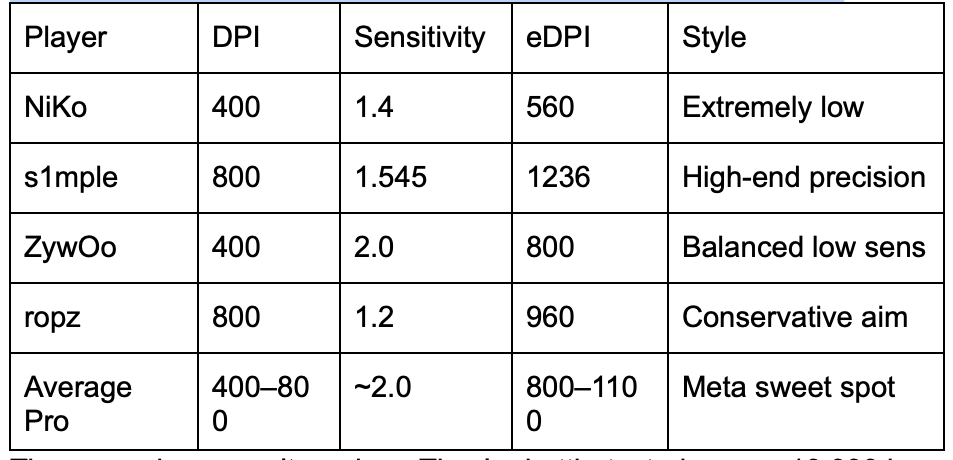
These numbers aren’t random. They’re battle-tested across 10,000 hours and 20,000 clutches.
If your eDPI is over 2000, you're not aiming — you're gambling.
To round it out:
Raw input? Always on.
Mouse acceleration? Always off.
Polling rate? 1000 Hz standard; 4000 Hz if you’ve got a spaceship mouse.
Just don’t try to feel fast. Feel accurate.
Crosshairs That Don't Distract You From the People You're Supposed to Shoot
Aiming starts in your crosshair. Keep it clean, or keep missing.
This isn’t Vegas. Your crosshair shouldn’t be flashing, pulsing, or bouncing. In CS2, static crosshairs are the only serious option — and for good reason.
Before you tweak your crosshair, here’s what you need to think about:
Visibility on all maps
Size relative to heads at range
A shape that doesn’t block vision
Zero distractions
Here’s a quick list of crosshair traits most pros agree on:
Bright colour (green, cyan, yellow — never white or red)
Small to medium size
Thin lines, minimal outline
No dynamic bounce
No center dot unless you’re an AWP main
Pro tip: Use crosshair codes to experiment. Share them like Spotify playlists. Just don’t blindly copy ZywOo and expect miracles.
Unless you’re AWPing blindfolded, you don’t need a crosshair that blinks.
Resolution — Yes, 4:3 Stretched Still Reigns
This isn’t a style choice. It’s a survival tactic.
Most people think using stretched res is about nostalgia. It’s not. It’s about making enemies look like bricks instead of needles.
Here’s a comparison of the most used resolutions by pros in 2025:
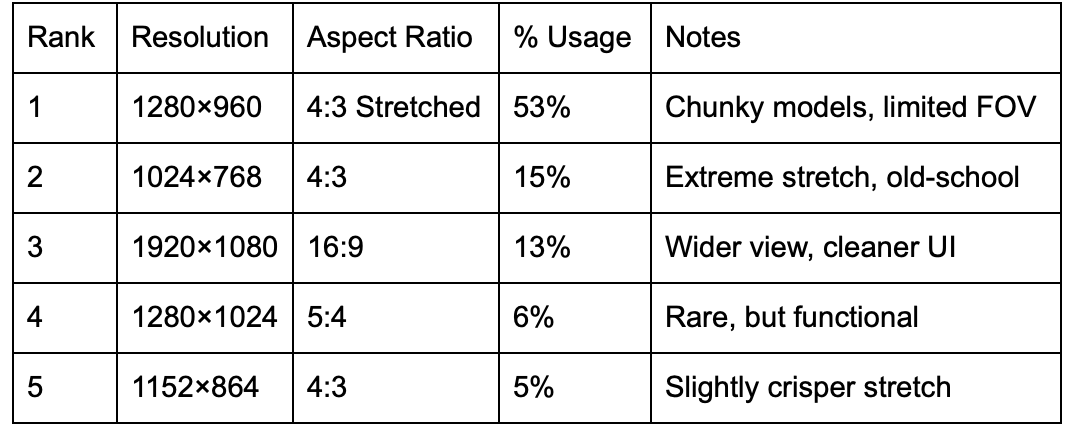
This isn’t about visual fidelity. It's about control. You don’t need ultra-wide if it means you can’t hit a head at B site.
The more pixel real estate your enemy takes up, the better your aim looks. That’s just science.
Try native first. Then stretch. See what clicks — literally.
Video Settings — FPS Is King
The only thing worse than dying in a duel is doing it at 80 FPS.
CS2 brought new toys: shadows that dance, smoke that curls, textures you can almost smell. Lovely. Until your frames tank and your molly looks like hot air.
Before we get to the list, here's the philosophy: lower settings = fewer distractions, better FPS, faster reactions.
Here’s a list of settings most pros immediately drop:
Ambient Occlusion — OFF
FidelityFX Super Resolution — OFF
High Shadows / Shaders / Particles — LOW
Anti-aliasing — 2x or 4x, max
NVIDIA Reflex — ON + Boost if you can
And yes, Boost Player Contrast is actually useful. It makes enemies pop from backgrounds, especially on cluttered maps.
Ultra settings = why is my molly invisible?
Keybinds — Saving Milliseconds One Mouse Button at a Time
You’re not cycling to your smoke in a 1v2. Or at least, you shouldn’t be.
If you’ve ever died while scrolling for your molly, that’s on you. Fix it. Pros don’t cycle grenades. They bind them.
Here’s a fast list of practical binds that actually help:
mwheelup / down +jump — For bunny hops, trick jumps
C, X, F, Mouse4/5 — For individual nades
Z or B — Drop bomb instantly
K or Mouse3 — Push-to-talk (optional but common)
You don’t need a config bible to do this. Just set it once and forget it. The less you fumble, the more you frag.
Viewmodel Tuning — Or, “Why Is My Gun in the Way?”
Your gun isn’t the main character. Push it out of frame.
Have you ever peeked around a corner and sworn your own weapon blocked the enemy’s head? That’s a view model problem.
Crank your viewmodel_fov to 68. Drop offset_z to around -1.5. Push it out with offset_y -2. Let your gun live in the corner of your screen, not front and center like it’s trying to photobomb every duel.
Some weirdos center their weapon like it’s Quake — hey, to each their own — but most pros push it far out of the way. That’s the goal: maximum visibility, minimal gun real estate.
And no — still no left-hand viewmodel. We're all righties now. Grumble later. Peek now.
Sound Settings That Actually Help You Not Die
Sound isn’t flavor. It’s radar. And most people are using it wrong.
Most casual players have surround sound on and game music blasting. And then they wonder why they didn’t hear the guy walking behind them.
Here’s a quick rundown of what to do:
Use Stereo, not 7.1
L/R Isolation: 100%
Perspective Correction: OFF
EQ Profile: Crisp
Music Volume: 0% (except Bomb Timer: 5–10%)
No one’s saying ditch your favorite headset. But if you’re not hearing footsteps properly, nothing else matters.
In CS2, you don’t need better sound — you need less of everything else.
Autoexecs, Launch Options, and the Myth of -tickrate
Config doesn’t stick? Then you don’t own it. Autoexec or bust.
Your autoexec is your insurance policy. Forget trusting the in-game menu — it resets more often than a bad memory.
Still-useful launch options for 2025 include a few basics: high CPU priority, fullscreen mode, refresh rate lock, and frame rate uncapping.
What’s dead? Tickrate, novid, and any netcode tweaks from your old CS:GO folder. Let them go. They’re ghosts in a subtick world.
Bring your autoexec to LAN. Sync it across PCs. Back it up like it’s your Steam password.
FAQs: For Everyone Still Asking on Discord
Is 400 DPI better than 800 DPI in CS2?
Doesn’t matter. Just pick one and adjust your sens to hit the right eDPI.
Does 4:3 really give an advantage?
Visually, yes. Technically, no. But the aim boost is real for many.
Can you still use the left-hand view model in CS2?
Nope. Valve hasn’t added it (yet?).
Why does my crosshair look different at different resolutions?
Stretched res changes proportions. It’s a visual quirk, not a bug.
What’s the best launch option setup right now?
Clean and simple: high priority, fullscreen, FPS uncapped, third-party software allowed.
Should I use NVIDIA Reflex On or On+Boost?
If you can, use On+Boost. Lower input latency is always worth it.
Why do some players still cap FPS at 300?
To keep frame timing stable. Spikes are worse than caps.
Where do I put my autoexec.cfg in CS2?
In the usual config folder — still labeled csgo even though it's CS2.
Final Thought
Configs won’t make you a god. But they’ll stop you from feeling like you're playing in handcuffs. They’re not about magic. They’re about control. Your mouse, your view, your sound, your pace — all tuned to your liking. Copy a pro. Tweak it. Test it. Own it. And most importantly? Just don’t forget to save it. Steam Cloud still forgets your autoexe.